Online Typing Speed Test
Test Complete!
Great job! Here are your results:
1. The “Home Row” Holy Grail
The secret to speed isn’t moving your hands faster; it’s moving them less. Your fingers should always return to the Home Row:
-
Left Hand: A, S, D, F
-
Right Hand: J, K, L, ;
-
The Anchors: Feel those tiny raised bumps on the F and J keys? Those are there so you can find your way back home without ever looking down.
2. Assign Every Finger a “Territory”
One of the biggest speed-killers is using your index finger for everything. To type like a pro, every finger has a dedicated “neighborhood” of keys.
-
Pinkies: Handle the edges (Shift, Enter, Tab, A, P, Q, Z).
-
Thumbs: Exclusively for the Space Bar. (Most pros use just the right thumb, but find what feels natural!)
-
The Rest: Each finger slides diagonally up or down from its Home Row position.
3. Stop Looking at Your Hands (Seriously!)
This is the “Great Wall” of typing. As long as you look at your keyboard, your brain has to perform a three-way handshake: Think the word ➔ Find the key ➔ Look at the screen. When you Touch Type, you remove the middle step. Your brain goes straight from thought to screen. If you get lost, use those “F” and “J” bumps to reset—don’t peek!
Pro Tips for Instant Improvement
-
Accuracy is King: Speed is a byproduct of accuracy. If you make a mistake, you have to hit backspace twice, then re-type. That’s three extra keystrokes! Slow down until you can hit 98% accuracy, and the speed will follow.
-
The “Slow is Smooth” Rule: Try to maintain a steady rhythm. Instead of typing easy words fast and hard words slow, try to type at a consistent, rhythmic pace.
-
Use Your Ears: If you have a mechanical keyboard, listen to the “click.” Creating a steady “drumbeat” with your keystrokes helps build a flow state.
-
Posture Matters: If your wrists are resting on the desk, you’re slowing yourself down. Keep your wrists slightly elevated (floating) and your back straight to avoid fatigue.
The “Golden Rules” of Typing Lessons
Before you even hit the first key, these four habits will determine 90% of your success:
-
The Home Row is Your Base: Your fingers should always live on
A S D FandJ K L ;. The little bumps on the F and J keys are your “tactile anchors”—use them! -
Stop Looking Down: This is the hardest habit to break. Typing lessons are designed to build muscle memory. If you look at your hands, you’re training your eyes, not your fingers.
-
Accuracy > Speed: Speed is a byproduct of accuracy. If you type 100 WPM but have to backspace every third word, you’re actually typing at 40 WPM. Slow down until you hit 98% accuracy, and the speed will come naturally.
-
Ergonomics Matter: Sit straight, keep your elbows at a 90° angle, and let your wrists float slightly. Your future self will thank you for avoiding the strain.
Boost Your Typing Speed with Our Free Online Typing Test
In today’s fast-paced digital world, typing quickly and accurately is an essential skill. Whether you’re a student, professional, or job seeker, improving your typing speed can save you time and increase productivity. Our free online typing speed test helps you measure and enhance your typing skills with customizable options for different practice durations.
Why Take a Typing Speed Test?
Typing efficiently is crucial for many reasons: Visit
-
Increased Productivity – Faster typing means completing tasks more quickly.
-
Career Advancement – Many jobs require strong typing skills (e.g., data entry, programming, content writing).
-
Better Accuracy – Reducing mistakes means less time spent correcting errors.
-
Track Progress – Regular practice helps you monitor improvement over time.
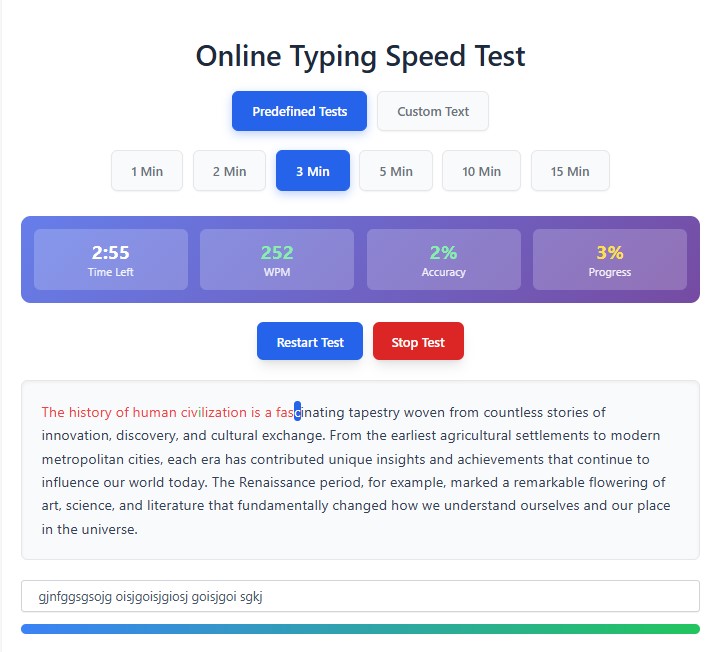
Our typing test provides real-time feedback on your Words Per Minute (WPM), accuracy, and progress, helping you identify areas for improvement.
How Our Online Typing Test Works
Our tool is simple and user-friendly:
-
Choose Your Test Mode
-
Predefined Tests – Select from 1, 2, 3, 5, 10, or 15-minute tests with curated passages.
-
Custom Text Mode – Paste your own text (great for practicing specific content like emails, reports, or coding).
-
-
Start Typing
-
The timer begins automatically when you start typing.
-
The test highlights correct (green) and incorrect (red) keystrokes in real time.
-
-
Get Instant Results
-
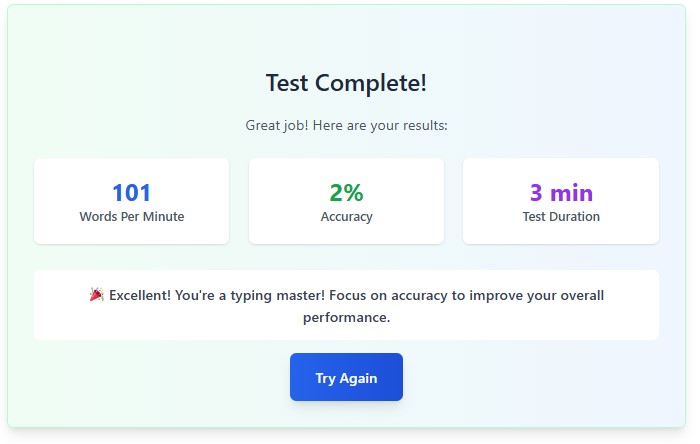
After completion, see your WPM, accuracy, and performance feedback.
-
Compare your results over time to track improvement.
-
Features of Our Typing Speed Test
✅ Multiple Durations – Test your speed in short bursts (1-3 min) or endurance (10-15 min).
✅ Custom Text Option – Practice with your own content (ideal for work or study).
✅ Real-Time Stats – Monitor WPM, accuracy, and time remaining as you type.
✅ Detailed Feedback – Get insights on your typing strengths and areas to improve.
✅ Mobile-Friendly – Works smoothly on both desktop and mobile devices.
How to Improve Your Typing Speed
-
Practice Regularly – Consistent practice builds muscle memory.
-
Focus on Accuracy First – Speed will naturally improve as you reduce errors.
-
Use All Fingers – Proper finger placement (home row technique) maximizes efficiency.
-
Avoid Looking at the Keyboard – Train yourself to type without glancing down.
-
Take Breaks – Prevent fatigue by resting your hands during long typing sessions.
Who Can Benefit from This Test?
-
Students – Improve typing speed for essays and assignments.
-
Professionals – Boost efficiency in emails, reports, and data entry.
-
Programmers – Faster coding with fewer typos.
-
Job Seekers – Many roles require typing tests as part of the hiring process.
Try It Now!
Ready to test your skills? Click here to start typing! (or embed the typing test directly in the blog post).
Bookmark this page and challenge yourself to improve your WPM over time. Happy typing!
Frequently Asked Questions (FAQ)
❓ What is a good typing speed?
-
Average: 40 WPM
-
Good: 50-70 WPM
-
Excellent: 80+ WPM
❓ How is WPM calculated?
-
1 word = 5 characters (including spaces).
-
WPM = (Total characters typed / 5) ÷ minutes taken.
❓ Can I use this for job applications?
Yes! Many employers accept online typing test results as proof of skill.